The Phomemo M120 Label Maker review centers on a compact thermal printer for people who need small product, address, barcode, or organization labels without ink.
Its adjustable 20–50 mm label range, phone app, and USB connection give it more flexibility than a phone-only labeling tool.
Phomemo M120 Review Summary
The quick verdict
1,000+ ratings
Read Amazon ReviewsPhomemo M120 Label Maker
The Phomemo M120 suits home organizers and small businesses that want portable, app-designed labels and both Bluetooth and USB printing.
- Portable thermal printer weighing 200 g, with a stated capacity of up to 3,000 labels per charge.
- Supports 20–50 mm label widths through an adjustable paper slot and built-in sizing guide.
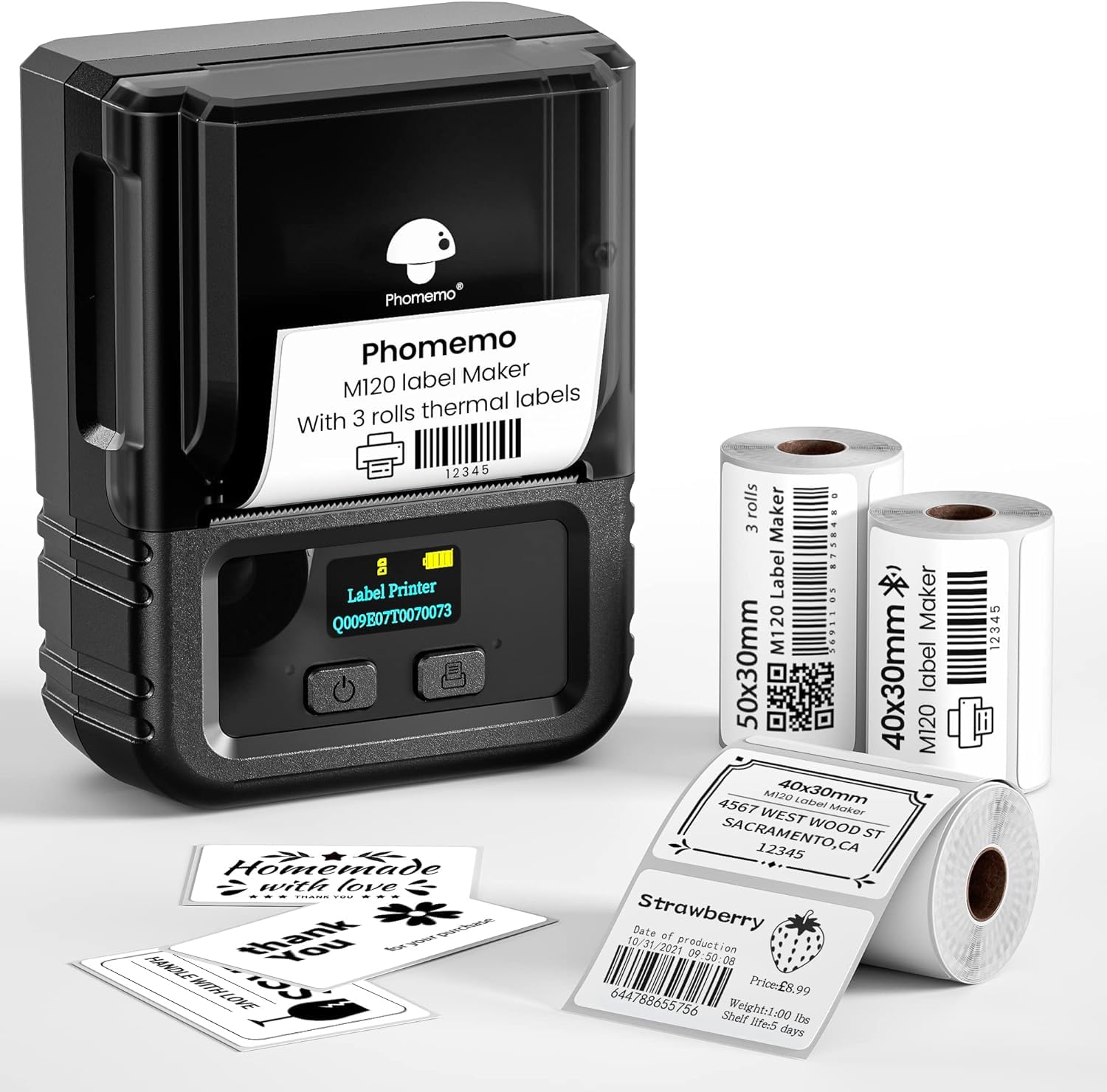
- Includes two 40 × 30 mm label rolls and one 50 × 30 mm roll.
- Print Master app includes voice and image recognition, barcode and QR tools, 7,900+ symbols, 1,900+ templates, and 550+ fonts across 20+ languages.

Pros
- Three included rolls provide two compact label sizes to start with.
- Bluetooth and USB options make it suitable for phone-based and PC-based workflows.
Consider before buying
- The supported 20–50 mm widths are too small for standard 4 × 6 inch shipping labels.
- PC printing involves a USB connection and Labelife software setup, rather than the phone app’s Bluetooth workflow.
Read the full review summary
The M120 is designed for short-run labeling around the home, a craft area, or a small business.
It prints monochrome labels on thermal media, and the supplied package includes two 40 × 30 mm rolls and one 50 × 30 mm roll, so buyers can try two formats before choosing refills.
Its main appeal is a mix of portability and workflow options: Bluetooth printing from iOS or Android, plus USB printing from a PC using Labelife software.
The Print Master app offers barcode and QR tools, OCR and voice recognition, and a broad collection of templates, symbols, and fonts. The tradeoff is that it is sized for compact labels, not large shipping labels.
The buying factors
Phomemo M120 Scorecard
Editorial scores reflect listed features and buyer fit; they are not laboratory measurements or customer ratings.
Label-width flexibility
The adjustable slot supports label widths from 20 to 50 mm, which covers a useful range of small labels.
Device compatibility
Bluetooth printing for iOS and Android plus USB printing from PC gives buyers two ways to work.
App design tools
OCR, voice recognition, barcode tools, and extensive templates and fonts support varied label designs.
Portability
At 200 g, the printer is light enough to carry between a desk, market table, or storage area.
Power convenience
The stated capacity of up to 3,000 labels per charge and five-minute auto-sleep are useful for intermittent jobs.
Large-label suitability
Its 20–50 mm label range is suited to compact labels rather than standard 4 × 6 inch shipping labels.
Key Features and Specifications of Phomemo M120
- Portable thermal printer weighing 200 g, with a stated capacity of up to 3,000 labels per charge.
- Supports 20–50 mm label widths through an adjustable paper slot and built-in sizing guide.
- Includes two 40 × 30 mm label rolls and one 50 × 30 mm roll.
- Print Master app includes voice and image recognition, barcode and QR tools, 7,900+ symbols, 1,900+ templates, and 550+ fonts across 20+ languages.
- Bluetooth printing is available from iOS and Android; PC printing uses a USB connection and Labelife software.
- Thermal printing avoids ink, and print density and speed can be adjusted.
- Auto-sleep mode is set to conserve power after five minutes of inactivity.
Pros and Cons of Phomemo M120
Pros
- Three included rolls provide two compact label sizes to start with.
- Bluetooth and USB options make it suitable for phone-based and PC-based workflows.
- The app combines text conversion, barcode creation, and many ready-made design resources.
- Low weight and the stated per-charge capacity support labeling away from a fixed desk.
Consider before buying
- The supported 20–50 mm widths are too small for standard 4 × 6 inch shipping labels.
- PC printing involves a USB connection and Labelife software setup, rather than the phone app’s Bluetooth workflow.
- For best performance, the product description recommends Phomemo thermal labels, so buyers should check refill availability and cost for their intended sizes.
Who Should Buy Phomemo M120?
Good fit
Consider the M120 if you routinely label jars, storage containers, small products, folders, or packages with compact address labels.
Its width range and included 40 × 30 mm and 50 × 30 mm rolls give you room to match label size to the amount of text or code you need.
It also makes sense if you want to design labels on a phone but occasionally print from a PC.
The app’s OCR and voice recognition can help move text into a label design, while barcode and QR tools address common small-business and inventory tasks.
Check that the Print Master app and Labelife software fit your preferred devices and workflow before buying.
The M120 is a stronger fit for recurring small batches than for large-format shipping work.
Its compact form and stated capacity of up to 3,000 labels per charge could be handy when moving between work areas, while its thermal format avoids ink purchases.
Who should skip it
Skip it if your main job is printing standard 4 × 6 inch postage labels; the M120’s stated 20–50 mm width range is designed for smaller formats.
Look elsewhere if your workflow depends on color output or needs label sizes outside the supported width range.
This model is described as a thermal label printer, so confirm that the monochrome output and available thermal media suit the labels you plan to use.
How the Phomemo M120 Fits Small-Label Work
Label size shapes the use case
The M120 handles widths from 20 to 50 mm, with the included rolls measuring 40 × 30 mm and 50 × 30 mm.
That range works for compact product, storage, and identification labels, but it does not cover the wide format used for standard 4 × 6 inch shipping labels.
Before choosing it, measure the label area you need and consider how much text or barcode information must fit.
Two printing paths add flexibility
Phone users connect over Bluetooth through the Print Master app, while PC users connect by USB and use Labelife software.
This is useful when label design and order records live on different devices, though computer printing requires a wired setup and separate software.
Buyers should check compatibility with their own computer and preferred operating system before relying on that workflow.
App tools can speed up repeat designs
The app’s barcode and QR options support common product-label tasks, while image and voice recognition are intended to turn source material into editable text.
Its large library of templates, symbols, and fonts offers ways to vary the layout without starting from scratch.
For repeat jobs, the practical benefit depends on whether the available designs and editing steps match the labels you make most often.
Thermal printing keeps supplies focused
Direct thermal printing removes the need to buy ink for the printer, leaving thermal labels as the recurring supply to plan for. Density and speed adjustments offer some control over output for different jobs.
Since the description recommends Phomemo thermal labels for best performance, check that the right sizes are easy for you to source before settling on the M120.
Alternatives to Phomemo M120
Desktop Label Printers alternative

6,000+ ratings
Read Amazon ReviewsPhomemo M110 Label Maker
Choose between them by comparing the included roll formats and the app and computer workflow you prefer.
The M110’s listed 50 × 80 mm roll may suit labels needing more length; the M120 explicitly adds USB PC printing in its described connection options and a larger app resource library.
- The M110 also supports 20–50 mm widths and lists Android and iOS compatibility, Bluetooth 4.0, and batch printing.
- Its supplied rolls include 40 × 30 mm, 50 × 30 mm, and 50 × 80 mm formats.
- The M120 supports 20–50 mm widths, includes three rolls in two sizes, and offers Bluetooth phone printing plus USB PC printing.
Desktop Label Printers alternative

700+ ratings
Read Amazon ReviewsPhomemo M220 Label Maker
Consider the M220 if you need wider labels than the M120’s 50 mm maximum and want Bluetooth phone printing with USB computer connectivity.
The M120 remains the more compactly specified choice for narrow labels, while neither is the right fit for standard 4 × 6 inch postage labels.
- The M220 supports wider labels from 0.78 to 3.14 inches and connects to phones and tablets over Bluetooth or to PCs over USB.
- It is explicitly not designed for 4 × 6 inch shipping labels.
- The M120 is a 20–50 mm width printer with a 200 g body and stated capacity of up to 3,000 labels per charge.
Is Phomemo M120 Worth It?
The Phomemo M120 Label Maker is worth considering for people who need portable, monochrome labels in compact formats and want app-based design with both phone and PC printing options.
Its supplied roll sizes, broad design tools, and stated capacity of up to 3,000 labels per charge make it a flexible fit for home organization and small business labeling.
Buy it when 20–50 mm labels cover your work and you are comfortable using thermal media and the relevant app or PC software.
Choose a wider-format printer for standard shipping labels, and check refill availability for the sizes you expect to use.
Your review at a glance
1,000+ ratings
Read Amazon ReviewsPhomemo M120 Label Maker
The Phomemo M120 suits home organizers and small businesses that want portable, app-designed labels and both Bluetooth and USB printing.
- Portable thermal printer weighing 200 g, with a stated capacity of up to 3,000 labels per charge.
- Supports 20–50 mm label widths through an adjustable paper slot and built-in sizing guide.
- Includes two 40 × 30 mm label rolls and one 50 × 30 mm roll.
- Print Master app includes voice and image recognition, barcode and QR tools, 7,900+ symbols, 1,900+ templates, and 550+ fonts across 20+ languages.