The LISEN Tablet Stand is a clamp-on arm with separate tablet and phone clamps, designed to position a device around a desk or countertop.
This LISEN Tablet Stand iPad Holder Desk Mount review looks at its adjustable joints, surface limits, and the practical tradeoffs to consider before buying.
LISEN Stand Review Summary
The quick verdict
2,000+ ratings
Read Amazon ReviewsLISEN Tablet Stand
A flexible desk mount for readers, students, and hands-free calls who want one holder for a tablet or phone.
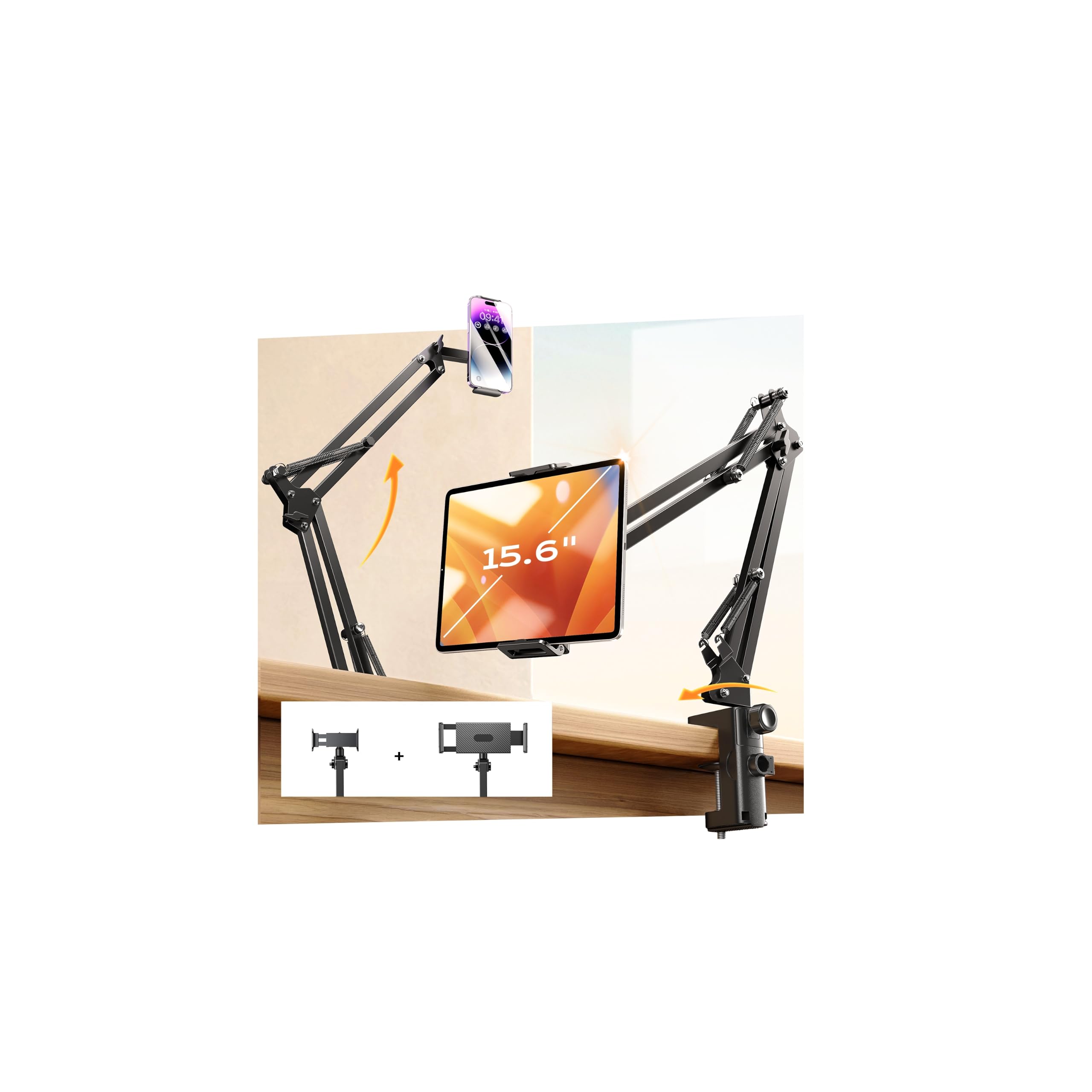
- Two clamps are included: one intended for a tablet and one for a phone.
- The clamps are described for devices measuring 4 to 13 inches.
- The arm has four joints, multiple adjustment points, and 360-degree rotation.
- A clamp base is intended for desks, dining tables, kitchen countertops, and other surfaces up to 2.83 inches thick.

Pros
- Separate tablet and phone clamps make it convenient to switch between device types.
- Several joints and full rotation allow adjustment for different viewing positions.
Consider before buying
- The clamp-on design requires an accessible edge and a surface within the 2.83-inch thickness limit.
- A long, adjustable arm can take more space around a desk edge than a compact tabletop stand; check clearance before choosing a position.
Read the full review summary
This stand combines a clamped base, a multi-joint arm, and two device clamps intended for tablets and phones.
That setup may suit a shared workspace or household where devices and viewing positions change, while the clamp-on format keeps the holder attached to an edge rather than occupying the central area of a desk.
Its appeal depends on whether your usual surface and device fit the stated limits.
The base is specified for surfaces up to 2.83 inches thick, and the clamps are described as compatible with devices from 4 to 13 inches.
The product description also gives a maximum support load of 3.2 kg, but does not establish how stable every device and arm position will be in a particular setup.
The buying factors
LISEN Stand Scorecard
Editorial scores reflect listed features and buyer fit; they are not laboratory measurements or customer ratings.
Device versatility
Includes separate tablet and phone clamps, with stated compatibility for 4-to-13-inch devices.
Position adjustment
Four joints and 360-degree rotation offer several ways to position a device.
Mounting flexibility
The clamp can attach to desks, dining tables, and countertops up to 2.83 inches thick.
Stability design
The description highlights reinforced joints, a tightening knob, and an anti-shock spring, though real stability depends on setup.
Workspace fit
An edge-mounted arm can keep a holder off the main work surface, but needs a suitable edge and room for the arm.
Setup clarity
The broad compatibility claims are useful, but buyers should check their device dimensions and case against the clamp.
Key Features and Specifications of LISEN Stand
- Two clamps are included: one intended for a tablet and one for a phone.
- The clamps are described for devices measuring 4 to 13 inches.
- The arm has four joints, multiple adjustment points, and 360-degree rotation.
- A clamp base is intended for desks, dining tables, kitchen countertops, and other surfaces up to 2.83 inches thick.
- The product description specifies a maximum supported load of 3.2 kg.
- The arm and holder are described as carbon steel, with an anti-shock spring and a knob for tightening.
Pros and Cons of LISEN Stand
Pros
- Separate tablet and phone clamps make it convenient to switch between device types.
- Several joints and full rotation allow adjustment for different viewing positions.
- The edge clamp suits users who want to position a screen without placing a stand on the desk surface.
- The stated surface-thickness limit gives buyers a concrete first check for desk and counter compatibility.
Consider before buying
- The clamp-on design requires an accessible edge and a surface within the 2.83-inch thickness limit.
- A long, adjustable arm can take more space around a desk edge than a compact tabletop stand; check clearance before choosing a position.
- Device fit depends on the actual dimensions and case, so screen size alone may not settle whether a tablet will sit securely in the clamp.
Who Should Buy LISEN Stand?
Good fit
Consider this LISEN stand if you want to position a phone or tablet above a desk, counter, or table and value multiple adjustment points.
The two separate clamps are useful when you alternate between a phone and a larger device, or expect different people in the same space to use different devices.
Before buying, measure the thickness of the intended mounting surface and check that the device fits the 4-to-13-inch range. Also consider where the arm can extend without obstructing your hands, keyboard, or nearby workspace.
Those checks matter more than the number of adjustment points if your desk has limited clearance.
Who should skip it
Look elsewhere if you need a freestanding holder that can be moved around the tabletop without clamping to an edge, or if your preferred mounting surface exceeds the stated thickness limit.
This may not suit a setup where the arm cannot extend into the desired viewing position without getting in the way. Check the available clearance and your device's fit in the clamp before choosing it.
How the LISEN Stand Fits a Study or Desk Setup
Two clamps for changing devices
The separate tablet and phone clamps make this more adaptable than a holder dedicated to a single device type.
For a study area, that can mean positioning a phone for a call and later moving a tablet into view for reading or video, although changing devices still requires using the appropriate clamp.
Jointed arm and positioning
Four joints and 360-degree rotation provide a broad range of adjustment in principle.
That flexibility helps when the device needs to sit at a particular angle or viewing position; it also makes the available arm clearance and the location of the desk edge important parts of planning the setup.
Check the mounting surface first
The base is described for surfaces up to 2.83 inches thick, including desks and countertops.
Measure the edge where you plan to attach it, and consider whether that edge leaves enough room to operate the clamp and move the arm into position. The description specifically advises against use on metallic surfaces.
What the support claim means for buyers
The listed maximum load is 3.2 kg, alongside a tightening knob, reinforced joints, and an anti-shock spring.
Treat these as design details rather than a guarantee for every device position: a heavier device extended farther from the base may put a different demand on the setup, so position it carefully and check that the joints and clamp remain secure.
Alternatives to LISEN Stand
No alternative model is recommended here. Compare the mounting style, device fit, and adjustment range that matter to your routine before choosing another option.
Is LISEN Stand Worth It?
The LISEN Tablet Stand is worth considering if you want an adjustable, clamp-on holder that can accommodate either a phone or tablet.
Its four-joint arm, rotation, and separate clamps offer useful positioning options for study, calls, reading, or kitchen-counter viewing.
Choose it only after checking your device dimensions, mounting-edge thickness, and available arm clearance. The design depends on a suitable clamping surface, and the stated load limit alone cannot guarantee stability in every position.
Your review at a glance
2,000+ ratings
Read Amazon ReviewsLISEN Tablet Stand
A flexible desk mount for readers, students, and hands-free calls who want one holder for a tablet or phone.
- Two clamps are included: one intended for a tablet and one for a phone.
- The clamps are described for devices measuring 4 to 13 inches.
- The arm has four joints, multiple adjustment points, and 360-degree rotation.
- A clamp base is intended for desks, dining tables, kitchen countertops, and other surfaces up to 2.83 inches thick.